


myWIC Mosaic
4.9323.00 Reviews
App Specs
- Version
- 1.0.161428
- Updated On
- License
- Free
- Downloads
- 100,000+
- Developer
- Vexcel
- Categories
- Education
- Platform
- Android
Screenshots
 Analysis by AppCompare
For a family using WIC, the most useful app is not necessarily the one with the most features; it is the one that helps when you are making a quick decision at the store or trying to keep an appointment straight. myWIC Mosaic is built around those practical tasks: checking benefits, handling appointments and documents, and finding WIC foods. I see its appeal less as a replacement for every source of WIC information and more as a place to bring routine program tasks together.
That distinction matters because an app can make information easier to reach without removing every point of friction. A phone is handy when you need to check something on the go, but it still depends on having your account details and the relevant information available when you need them. I would treat myWIC Mosaic as a useful companion to the WIC process, rather than assuming it can settle every question about eligibility or a particular purchase on its own.
What it is built to help with
Vexcel developed this free education app for people who use WIC. Its central purpose is straightforward: keep common tasks, including appointments, document uploads, benefit details, and shopping for WIC foods, accessible from a phone. That makes it more specific than a general nutrition app or a standard calendar. The value comes from connecting everyday family routines with WIC-related information, rather than asking users to assemble everything from unrelated tools.
The app has an Everyone age rating, and its current version is 1.0.161428. It was released on October 17, 2022, and requires Android 5.0 or later. Its average rating is 4.9 from around 5,300 ratings, with 323 written reviews, and it has passed 100,000 installs. Those figures suggest that many people have found it worth trying, but they do not guarantee that every feature will suit every household or that a particular shopping question will be answered the way you expect.
Speed expectations for everyday tasks
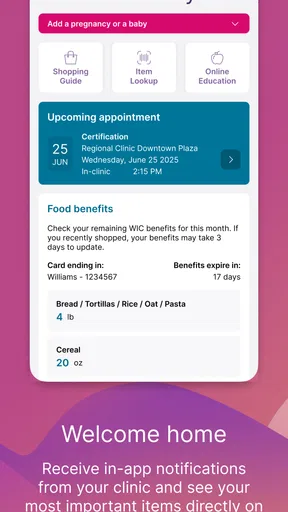
For a tool like this, I would judge speed by how directly it gets me to a practical answer, not by an assumption about how quickly every screen loads. The most useful rhythm is simple: open the app before shopping, check the relevant benefit information, and use its food-shopping tools while planning what to buy. Appointment and document tasks fit naturally into a separate check-in at home, when there is more time to confirm what needs attention.
I would avoid leaving every step until I am already in a checkout line. Even a well-organized app is less helpful when I am rushed, distracted, or trying to resolve a question while other people wait. Looking over the relevant information before a trip gives me a chance to notice an issue and choose a sensible next step without relying on a last-second search.
How it compares with piecing things together
The usual alternative is a mix of paper notes, a calendar, saved documents, and whatever WIC information a person can find while shopping. Each of those can work, especially for someone who prefers familiar routines, but the pieces are easy to separate from one another. A dedicated WIC app has a clearer role: it puts program-related tasks in one place instead of making a generic notes app pretend to understand benefit shopping.
Worth Reading Before You Choose

EA SPORTS FC Mobile 26 Is a Bigger Football Game, but It Takes Time

Flipboard Shows What News Apps Must Do Beyond the Feed

Switching to Android Auto Means Rethinking Your Driving Routine

Google Calendar Makes a Crowded Week Easier to Manage

Ludo King Makes the Most of the Minutes Between Plans

Baby Panda World Brings Quick Play to Modern Phones, but Its Game Library Feels Busy
That does not make it a substitute for every other source of help. A calendar may still be the better choice for a household’s full schedule, while a paper reminder can be reassuring for someone who does not want to depend on a phone. I would use myWIC Mosaic for the WIC-specific part of the routine and keep whatever other system already works for family appointments and personal records. The sensible comparison is not “app or no app”; it is whether one focused tool reduces the effort of switching between several disconnected ones.
A lower-stress shopping routine
A realistic use case is a caregiver checking benefit information at home, making a shopping plan, and then using the app as a reference during the trip. That order matters. It separates planning from the noise of a busy store and leaves the phone available for questions that come up along the way. If a product or benefit detail seems unclear, I would pause and verify it through an appropriate WIC contact rather than treating an app screen as a reason to guess.
One useful habit is to make the app part of a small pre-shop checklist: check what you intend to use, note any food questions, and make sure appointment or document tasks are not being forgotten. This is not an extra feature claim; it is a way to get more value from the tasks the app is designed to support. It can also help a caregiver who shares shopping responsibilities explain what needs to be checked without relying on memory alone.
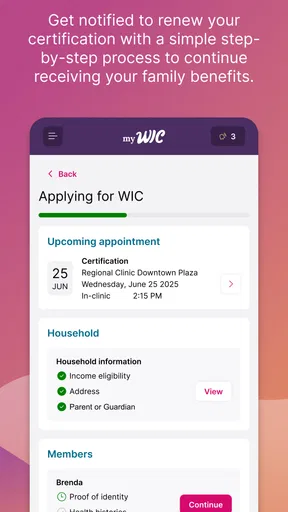
Document uploads and appointment tools are most helpful when handled before they become urgent. If there is a document to submit, I would set aside a quiet moment to select it and review the action before sending it. If an appointment is approaching, checking the schedule ahead of time gives me room to plan around it. The trade-off is that an app-based routine still asks the user to remember to open the app; it cannot help with a task that never gets entered or checked.
Heavy-use moments and practical limits
The busiest moment is likely to be a shopping trip when a child is tired, the store is crowded, and a purchase needs a quick check. That is precisely when a focused WIC resource can be more useful than searching through old messages or trying to recall details. At the same time, I would not make the app the only preparation. A short list of planned purchases and a quick review before leaving can make the in-store check less pressured.
Another demanding moment is managing several small responsibilities at once: an upcoming appointment, paperwork, and a grocery trip. These tasks belong to different parts of life, but they can compete for attention in the same week. I find it more realistic to check them at separate times rather than expect one visit to the app to solve everything. That approach also makes it easier to spot which task needs action now and which can wait.
There is a practical limit to what a phone-based tool can do: it can organize access to WIC tasks, but it cannot remove uncertainty from every real-world situation. A user may still need help understanding a benefit detail or resolving a question about a particular food. I would treat the app as a first stop for routine checks, not the final authority for every edge case. That is a useful boundary, not a reason to dismiss the convenience it offers.
Reliability, preparation, and recovery
I would build a little flexibility into any important task. Before relying on an appointment detail or document action, check it early enough to follow up if something looks wrong. Before a shopping trip, review the information you expect to need while you have time to think. These habits are especially useful when an app is part of a family’s routine, because they reduce the chance that a small uncertainty becomes a rushed decision.
For purchases, it is sensible to keep a backup plan: if an item’s status or a benefit detail is not clear, set it aside and seek clarification rather than buying it based on a guess. The same principle applies to appointments and paperwork. Keep track of what you have completed, and confirm important next steps through the appropriate WIC channel when you are unsure. The app can make the process easier to manage, but good follow-through still matters.
Who is likely to get the most from it
I would recommend giving myWIC Mosaic a try if you are already part of WIC and often need to look up program-related details, manage appointments, or keep documents and shopping tasks from getting scattered. It is particularly suited to someone who uses a smartphone regularly and wants a single place to begin when a WIC question comes up. The free price also makes it easy to try without adding a purchase decision to the process.
It may be less useful for someone who prefers paper records, rarely uses a smartphone, or already has a reliable method for keeping WIC tasks organized. It is also not the right answer for someone expecting a general meal-planning service or a complete replacement for direct program assistance. In those situations, an existing calendar, paper folder, or conversation with a WIC office may be more helpful. Choosing a different method is reasonable if it fits the person’s habits better.
Across education apps, many options focus on broad lessons or general health advice. This one has a narrower, more practical purpose: supporting WIC-related decisions and tasks. That focus is its strength for the intended audience, but it also means it is not designed to cover every nutrition topic or household need. I would pair it with other resources only when those resources answer a separate question, rather than expecting one app to do everything.
Getting Started with myWIC Mosaic
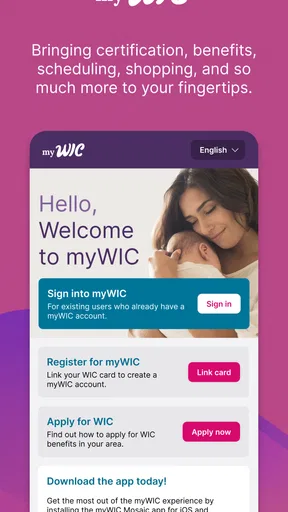
First off, downloading and setting up myWIC Mosaic was a breeze. Available on both Android and iOS, the app is free and lightweight, so it didn’t hog much space on my phone. Once installed, I was prompted to enter my WIC ID, which connected me to my benefits almost instantly. Talk about convenience!
Features That Stand Out
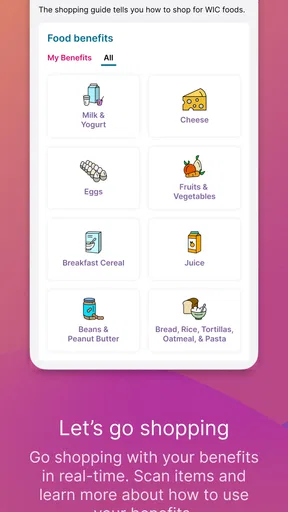
The app is packed with features that make managing WIC benefits a walk in the park. One of the first things I explored was the shopping list feature. It automatically updates based on my remaining benefits, ensuring I never overspend or run out unexpectedly. This feature alone cuts down a lot of my grocery shopping stress.
Another cool feature is the integrated nutrition education resources. These are not just some random articles thrown together; they are tailored to my family's needs based on the age and nutritional requirements of my kids. I found these resources both informative and practical, helping me make better food choices every day.
Navigating the App
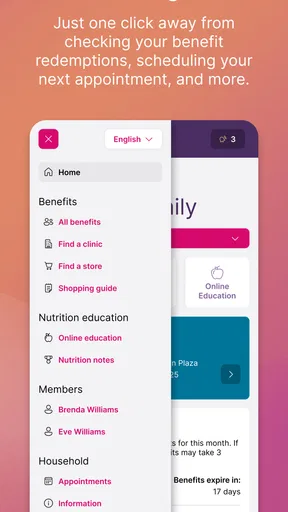
Navigating through myWIC Mosaic is as smooth as butter. The interface is user-friendly and intuitive, so even if you’re not tech-savvy, you’ll feel right at home. The main menu is clear, with options like Benefits, Groceries, Nutrition, and Appointments, all laid out neatly. I particularly liked how I could quickly check my next WIC appointment and set reminders. No more missed dates!
Real-Life Benefits
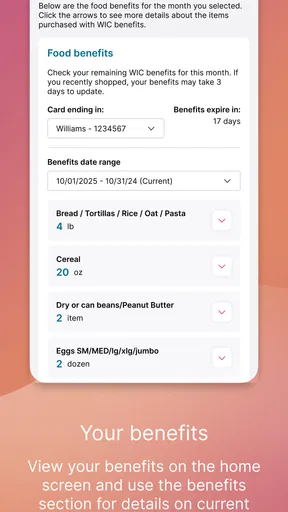
Using myWIC Mosaic has genuinely improved how I manage my WIC benefits. I used to struggle with keeping track of what I could buy and when. Now, with the app’s real-time updates, I’m always in the know. Plus, the barcode scanner feature helps me verify if an item is WIC-approved before heading to the checkout. This has saved me from many awkward moments at the store!
And let’s not forget the money-saving aspect. The app’s recipe suggestions and meal planning tools have helped me stretch my benefits further while ensuring my family gets balanced meals. It’s like having a nutritionist in my pocket!
Ending Thoughts
In a nutshell, myWIC Mosaic is a game-changer for anyone involved in the WIC program. It’s not just an app; it’s a supportive companion that simplifies managing benefits and enhances family nutrition. If you’re looking for a way to make the most out of your WIC benefits, this app is definitely worth a try.
So, if you haven’t already, head over to the App Store or Google Play and download myWIC Mosaic. Trust me, you won’t regret it!
My performance verdict
For routine checks and planning, the app’s focused purpose is more important than any promise of raw speed. I would use it before a trip to get oriented, then return to it for a specific question instead of repeatedly opening it without a plan. That small change makes the experience feel more purposeful and reduces the chance of trying to solve several unrelated tasks in a hurry.
My overall recommendation is strongest for WIC participants who want program tasks within easy reach and are comfortable managing them on a phone. The app is free, focused, and aimed at practical needs, while its limits are the ordinary ones of any digital aid: it depends on the user checking information and following up when a situation is unclear. If that balance suits your routine, it is a sensible tool to add; if paper or direct assistance already works better for you, there is no need to force a change.
Pros
- User-friendly interface enhances navigation
- Quick access to WIC benefits and resources
- Secure login ensures personal data safety
- Provides localized grocery store locations
- Instant updates on program changes
Cons
- Limited offline functionality
- Requires regular updates for smooth operation
- Occasional login issues reported by users
- Not all features available in all states
- Some users find notifications overwhelming
FAQs for myWIC Mosaic
What is myWIC Mosaic and what does it offer?
myWIC Mosaic is a comprehensive app designed to assist users participating in the Women, Infants, and Children (WIC) program. It provides features like appointment scheduling, balance checks, and nutritional guidance. The app aims to simplify access to essential resources and enhance user engagement with the WIC services.
How do I register for myWIC Mosaic?
To register for myWIC Mosaic, users must first have a valid WIC account. Upon downloading the app, you’ll need to enter your WIC identification details to authenticate your account. Follow the on-screen instructions to complete the registration process and gain full access to the app’s features.
Is myWIC Mosaic available for both Android and iOS devices?
Yes, myWIC Mosaic is available for download on both Android and iOS platforms. Users can find the app on the Google Play Store for Android devices and the Apple App Store for iOS devices. Ensure your device meets the minimum system requirements for a smooth experience.
Can I use myWIC Mosaic to check my WIC benefits balance?
Absolutely, myWIC Mosaic allows users to easily check their current WIC benefits balance. The app provides a real-time update of your available benefits, helping you manage your resources effectively and ensuring you’re aware of your remaining balance before making purchases.
Is myWIC Mosaic a free application?
Yes, myWIC Mosaic is a free application for all users enrolled in the WIC program. There are no hidden costs or subscription fees associated with the app. It is designed to provide convenient access to WIC services without any additional financial burden to the users.


